 Indigenous
 Introduction
ParaMed is a St. Lawrence College partner organization that employs Registered Practical Nurses who are authorized to review and confirm medical clearance. The nurses at ParaMed clear students from multiple colleges, programs, and deliveries.
The role of the nurse with ParaMed is to review and confirm placement clearance only; they do not plan placements and are not authorized to grant extensions on behalf of the program. If students are not cleared by ParaMed they are required to contact the Pre-Placement Planning Coordinator directly and may not be eligible to complete their placement in their preferred term.
Before Getting Started
1. Ensure this page is for you. This page has been designed to support students studying in the following programs:
School of Nursing
- Bachelor of Science – Nursing (Honours)
- Practical Nursing
School of Allied Health
- Medical Laboratory Assistant/Technician
- Medical Laboratory Science
- Paramedic
- Personal Support Worker
School of Applied Science & Computing
- Biotechnology Advanced
- Veterinary Assistant
- Veterinary Technology
School of Community Services
- Autism & Behavioural Science
- Behavioural Science
- Communicative Disorders Assistant
- Community & Justice Services
- Early Childhood Education
- Honours Bachelor of Behavioural Psychology
- Social Service Worker
School of Business
- Office Administration – Health Services
2. Ensure you are available and committed to placement. Students must be fully available throughout this time; exceptions will not be made for childcare, employment, or other personal obligations.
Understanding ParaMed Requirements
While each program has specific ParaMed clearance requirements, the overall ParaMed process is the same for all students:
- Create or log in to your Placement Pass account.
- Download your program-specific ParaMed form.
- Complete all medical and non-medical requirements.
- Upload your completed documentation.
- Review your results in the Placement Pass Portal.
These steps are broken down further below.
Student ParaMed Access
Please review the steps below to create your account and navigate through the ParaMed Placement Pass site.
- Go to the SLC Placement Pass Portal
- Click on the Student Sign Up option on the homepage or the create account option in the upper right corner.
- A pop up will appear advising that you require a Student Account ID and a College issued email address in order to continue. If you have both of these requirements, continue to the next step by clicking on the Continue button.
- Enter in your student number and Date of Birth or Email Address depending on what is being requested and click the Continue
- If the student ID and Birthdate/email address entered are a match, you will be taken to the next step to create a password. Enter the password twice and click the Submit icon.
- A pop up will appear identifying if registration was successful. Click on the pop-up at the Click here option which will take you back to the login screen.
- Enter your Student ID number and the Password you created to log into the site.
1. If you have forgotten your password you can trigger a password reset from the sign-in screen, by clicking on the Forgot Your Password option.
2. Enter your email address and student number. An email will be sent to your account with the instructions to reset your password.
- When you log into your account you will be shown the programs that are associated with your registered account with the college. Click on the View Details
- The display screen is broken into 3 sections:
- The Status box will show your current status. If no documents have been submitted, it will identify what the next steps are in the process.
- The Options box identifies the actions in the process to submit the forms.
- The Requirements box identifies which requirements are needed for the program that you are registered in.
- Clicking on the view Requirements Details option on the bottom right corner of the requirements box will create a single page outlining all the requirements for your program. Details about those requirements can be found on this screen.
- Review this page to understand which documents are required to be submitted. Click on the Dashboard option at the top of the screen to return to the previous page.
- Click the Download Forms Option in the Options box to print a copy of the form that needs to be filled out by your Physician. Review the form and gather all the necessary documentation as outlined in the form and Requirements page.
Student Form Submission
Once you have completed all your medical and non-medical requirements, you will upload copies of all supporting documentation into your ParaMed account and make your payment.
You must upload your documentation on or before the placement deadline for your program. If you are not cleared by ParaMed by the deadline, you are required to contact the Pre-Placement Planning Coordinator directly and may not be eligible to complete your placement in your preferred term.
- Scan all of the documents you are required to submit. Cam Scanner or an Alternate mobile app can be utilized to complete the process.
- Click on the Submit Files option from the Options box.
- Click the Add File icon to upload the files from your device.
- Click on the Choose File icon and locate the file you scanned and click on it to attach it. From the Drop-down option identify what the file type is that you have uploaded.
- Once you can see the file has been attached, click the Save button to save what you have uploaded.
- If the file was attached successfully it will now be showing in the Files section. Continue uploading all the files by following Steps 3 & 4 for each file.
- Once you are satisfied that you have uploaded all the required files click the Continue icon in the bottom right corner to proceed.
- In the Status box, it will identify that the files have been received and when they will be reviewed. If you wish to review further what was submitted or ask any questions you can click on the View Details option in the bottom right corner.
- From the view details tab, you can submit additional documents if you realize you have forgotten to send one in your original transfer or ask a question to be answered by the nurse by clicking on one of those option icons.
- If you wish to ask a question click on the Ask a Question icon and enter your question in the free text box. Click submit.
- Your question will appear in the Application Details and when a nurse responds to your question it will be located at the bottom of the Clearance screen.
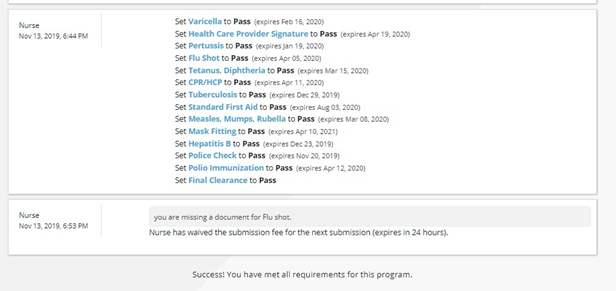
Once your clearance has been completed you can log into your account and review the results of each component.
Frequently Asked Questions
In a worst-case scenario for students who are missing specific immunizations, completing these requirements can take up to 6 months. For students with current immunization records the average time to prepare all ParaMed documentation is 6-12 weeks. If you are not cleared by the placement deadline, you will not be eligible for placement. This will prolong your graduation and may result in additional fees.
Please contact the Pre-Placement Planning Coordinator immediately.
At the end of your visit, you will need copies of all supporting documentation: the completed Clinical/Field Pre-Placement Health Form, your yellow immunization card and/or municipal/regional health unit documentation denoting a record of your immunization history and blood test results if applicable.
All items on this form are required for placement. It will be your responsibility to impress upon the health care provider that if you don’t have this, you cannot be cleared for field placement and will not be able to participate in this mandatory program course.
You are welcome to make an appointment with the closest Campus Health Centre. If you are outside the region, please visit a local walk-in clinic.
Section A of your forms cover all the medical requirements as outlined by your academic facility and your field placement facility/organization. It is your health care provider’s responsibility to complete and sign all the areas on section A where it requires his/her signature. These are the shaded areas. While they will guide you through what will be required from you in the process, it will be your responsibility to make sure the health care provider completes all the shaded areas required and provide you with the proof of the identified immunizations and blood test results.
If your program requires a current CPR and Standard First Aid Level C certificate, it must be completed through a Red Cross, St. John’s Ambulance, or equivalent First Aid course. You should be able to find an offering in your area by doing a quick Google search for “CPR and Standard First Aid Level C + your city/town.”
This course must be completed in-person to be valid, while blended options are approved online only first aid certification will not be accepted.
Some districts will require a letter from the college indicating why you require a Criminal Background Check with Vulnerable Sector Screening. If you require a letter, please complete the letter request located on your Placement HUB in Blackboard or email placements@sl.on.ca.
You are responsible for making sure your medical and non‐medical requirements are valid for the duration of your placement. If you are in a program with more than one placement, you will need to update any expired items prior to the placement deadline.